
Portal Hero Odoo module: installation and orders
Install the Odoo module, export your catalogue to the portals and receive every sale as a quotation in Odoo.
Connect your Odoo ERP with Portal Hero thanks to our integration module. This connector lets you export your product catalogue to the main sales portals and import received orders directly into Odoo. In this guide we explain how to install and configure the module so you can make the most of the integration between the two platforms.
Installation
The Portal Hero module for Odoo is installed like any other Odoo module. You can install it manually by uploading the module from the administration panel of your Odoo instance. Once installed, you will find a new 'Portal Hero' menu in the sidebar, with access to catalogue exports, imported orders and the module configuration.
Odoo version:
Configuration
Once the module is installed, it needs to be configured. To access the configuration page, go to Settings > Portal Hero. There you will find all the parameters needed for the connection and the operation of the module:
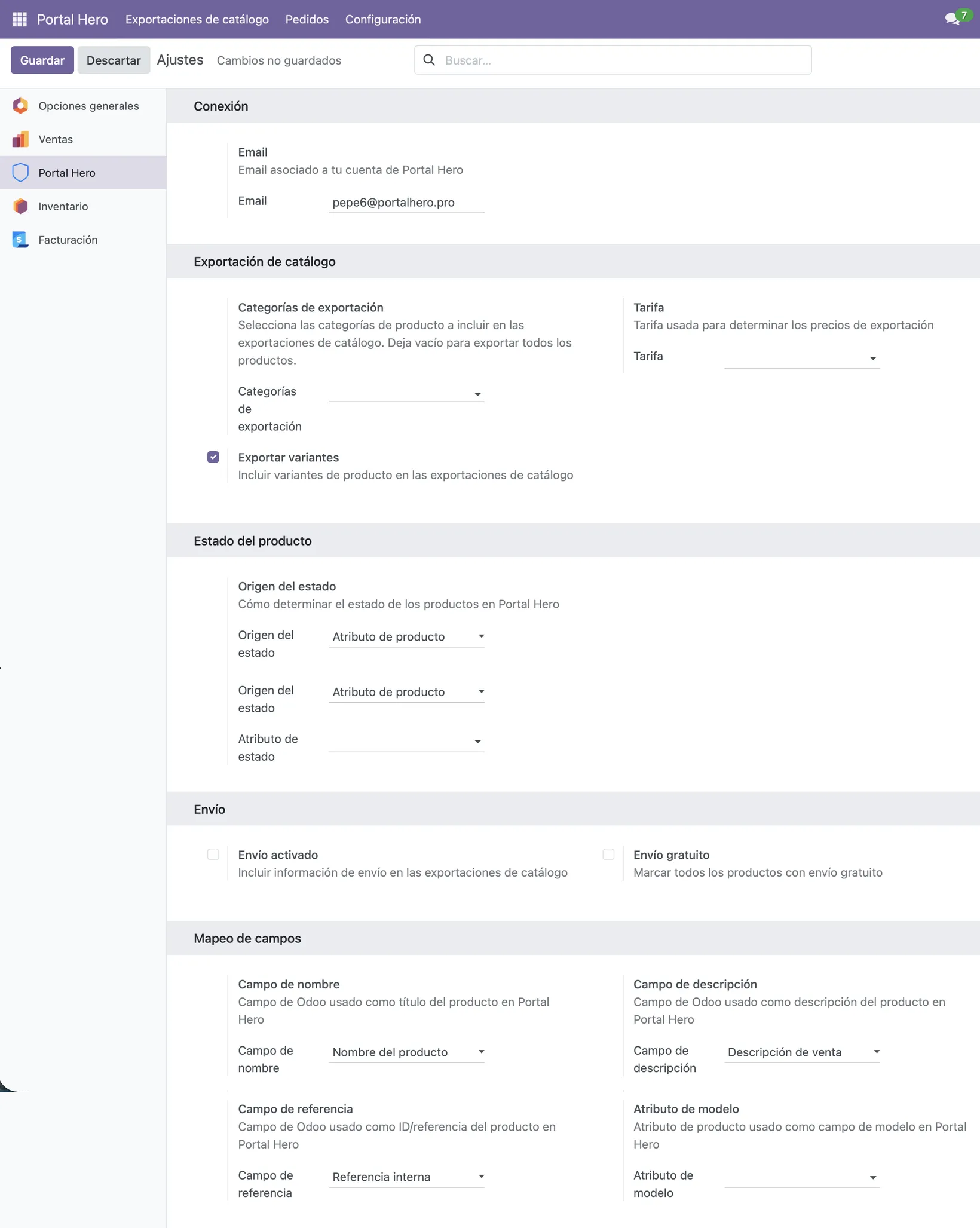
- Email: Enter the same email address you used to register or communicate with Portal Hero. It is used to link your account.
- Export categories: Select the product categories to include in catalogue exports. Leave empty to export all products.
- Price list: Price list used to determine export prices. If none is selected, the product's list price will be used.
- Export variants: Enable this option to include product variants in catalogue exports.
- Condition source: Determines how the products' condition is set in Portal Hero. There are two options:
- Product attribute: Select an Odoo product attribute that indicates the condition (new, good condition, etc.). On export, that attribute's value will be used for each item.
- Default value: If you do not have a product attribute that indicates the condition, or all your items share the same one, select one of the available conditions and all of them will be exported with it.
- Shipping enabled: Include shipping information in catalogue exports. Items with a weight reported will be marked as available for shipping.
- Free shipping: Mark all products with free shipping on the portals.
- Name field: Odoo field used as the product title in Portal Hero. By default it is the product name.
- Description field: Odoo field used as the product description in Portal Hero. By default it is the sales description.
- Reference field: Odoo field used as the product ID/reference in Portal Hero. By default it is the internal reference.
- Model attribute: Product attribute used as the model field in Portal Hero. This setting is optional.
Main features
The module offers two main flows. The catalogue export generates a CSV file with your Odoo products (including title, description, price, stock, images, category and weight) so that Portal Hero can publish them on its sales channels. It can be launched manually from the menu or via API, and the file is made available for download with a temporary link.
The order import receives orders from Portal Hero and automatically creates sales quotations in Odoo. The module looks up the customer by email (and creates them if they do not exist), resolves products by reference or barcode, and generates the order with the configured lines, warehouse, price list and sales team.
How synchronisation with Portal Hero works
For the general workings of synchronising your catalogue with the different portals, you have more information available here.