
Wallapop integration: your catalogue, no manual uploads
October 5, 2026 · by Portal Hero · 6 min read
How to connect your second-hand shop's catalogue with Wallapop: automatic publishing, stock up to date on every channel, orders and chats in one place.
It's eleven at night and a Wallapop message pops up: "Hi, is the PS5 still available?". It isn't. You sold it in the shop this morning, but the listing is still live because nobody remembered to take it down. Tomorrow you'll be apologising, and you might lose a sale and a review along the way.
If you run a second-hand shop, a refurbished store or a buy-and-sell business, this will ring a bell. Wallapop is one of the best shop windows for selling used goods in Spain, and more and more businesses are using it: according to Google Trends, searches for «wallapop profesional» in Spain have tripled over the last five years. Selling on Wallapop isn't the problem. Keeping it up to date is, once your catalogue grows from a few dozen products to hundreds or thousands.
In this article we explain how integrating a catalogue with Wallapop works, what Wallapop offers professional sellers and what you should get ready before connecting anything.
Wallapop is a channel for shops too
Wallapop started out as a place for people to sell things they no longer use, but today it has a clear place for businesses: Wallapop Pro, a subscription you take out per category (Multicategoría, Motos or Motor y accesorios, among others). It changes a few things:
- Your profile is shown as a professional seller.
- A single listing can hold several units in stock, instead of repeating the listing for every unit.
- You can offer buyers free shipping.
- You can publish via the API, which is what makes it possible to connect a whole catalogue.
Each plan has a maximum number of active listings. And here's the first catch: if you publish beyond that limit, Wallapop doesn't reject the listings, it creates them as inactive without telling you. With a large catalogue, keeping an eye on that limit is part of the job.
Uploading products to Wallapop by hand: where the limit is
Uploading a product to Wallapop looks quick: a few photos, a title, a price. But every listing asks for more than you'd think. You have to pick the right category out of more than 800, fill in the details each one requires (condition, brand, size, capacity…), add the weight if you're going to ship and write a description that makes sense.
With 40 products, that's an afternoon's work. With 1,500, it stops being viable. And the real problem starts afterwards, because a catalogue isn't uploaded once: it changes every day. New products come in, prices drop, units sell in the shop or on your website, and every one of those changes has to be repeated on Wallapop.
That's why many shops end up trying bots or browser extensions. They help you upload faster, but they work on top of your session, mimicking what you'd do, and they rely on the Wallapop website not changing. On top of that, stock and orders still live outside your system.
Integrating your catalogue with the Wallapop API
Integrating your catalogue means Wallapop is fed directly from wherever you already manage your stock: your online store, your ERP or a simple file. You work in one place and Wallapop keeps itself up to date.
That's what the Wallapop API is for: an official connection Wallapop offers to integrators and professional sellers. It lets you publish, edit and withdraw listings, accept the shipments buyers pay for and get notified of what happens to each listing. It isn't open access: Wallapop issues credentials through an onboarding process. A platform like Portal Hero is already onboarded and connects your account in a few minutes, with no development needed on your side.
How a product in your catalogue becomes a Wallapop listing
Once the catalogue is connected, every product goes through the same steps without you touching it:
- The Wallapop category that matches your product is chosen.
- The mandatory details for that category are filled in from your product record: condition, brand, size or capacity, as the case may be.
- The title, description and photos are prepared in the format Wallapop asks for, with your watermark if you use one.
- The shipping weight is calculated so the buyer can order it with delivery.
- It's published, and from then on every change in your catalogue is reflected in the listing.
 published 09:00
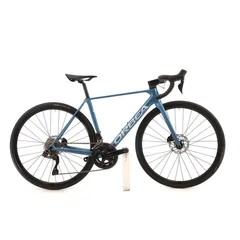 Orbea Orca M30i bike · size 50€2,089 · Cycling · refurbished
Tip: the more complete your product record is (brand, model, condition, dimensions), the better the details Wallapop asks for are filled in and the fewer listings are left waiting for review.
Sold in the shop, gone from Wallapop
Back to that PS5 at eleven at night. With the catalogue connected, the sale in the shop deducts the stock and the Wallapop listing is withdrawn or has its units reduced at the next sync. The same goes if you sell it on your website or on another marketplace.
And when the sale happens on Wallapop, it works the other way round: the order reaches your system and the stock is deducted on every other channel. While the shipment is under way, Wallapop keeps the listing as reserved, and when you sell outside Wallapop you can choose between marking it as sold, which keeps your sales history, or withdrawing it altogether.
Orders and chats without switching apps
On Wallapop, buyers ask before they buy: whether there's a warranty, whether you ship to their city, whether you'll take an offer. If those messages land in an app nobody checks in time, the sale goes to another seller.
With the integration, Wallapop chats reach the same inbox as those from the other marketplaces and WhatsApp, with the listing alongside, and you can answer them by hand, with templates or with automatic replies out of hours. When the buyer pays with shipping, the request is accepted from Portal Hero, manually or automatically, and the order lands in your store or your ERP with the carrier and the tracking.
Laura · Orbea Orca M30i
Hi, is it still available? Does it have a warranty?
Yes! It has been checked and comes with a 12-month warranty. You can buy it with shipping from the listing.
Great, I'll buy it now.
Frequently asked questions
Does Wallapop have an API?
Yes. Wallapop provides an API for integrators and professional sellers that covers listings, shipments and notifications. It isn't open access: it requires registration as an integrator, which Portal Hero already has, and a professional account on your side.
Do I need Wallapop Pro to connect my catalogue?
Yes. Publishing via the API, stock per listing and the shipping options are tied to the Pro plans for each category.
Can I connect my PrestaShop, WooCommerce or Shopify store with Wallapop?
Yes. With the Portal Hero plugin for PrestaShop or WooCommerce, or with the Shopify connection, the catalogue comes from your store and Wallapop orders go back to it.
Is it the same as using a bot?
No. A bot or an extension publishes from your session, as if it were you, and relies on the Wallapop website not changing. An integration uses the official API and publishes from your catalogue, with stock and orders connected to your system.
How long does it take to connect Wallapop?
A few minutes: you log in to Wallapop from your Portal Hero panel and authorise access, with nothing to install.
In short
Wallapop can be one of your best sales channels, but only once it stops being manual work. Connecting your catalogue means every product is published properly first time, whatever sells disappears in time, and chats and orders reach the place where you already work.
If you sell electronics, bikes, fashion or home goods, take a look at our solution for shops and chains. If you run a motorbike dealership, the motorbike one, and if you sell parts, the auto parts one. Or, if you'd rather, tell us what you sell and we'll show you how your catalogue would look on Wallapop.